If you edit talking-head videos in Premiere Pro, you may have come across AutoEdit, a plugin from Eleven Percent that uses Claude to build your first rough cut. It is easy to mix up with AutoCut, which is a different product. PrimCut is newer, and it's mine. This PrimCut vs AutoEdit comparison covers what each one does, where your audio goes and what each costs as of November 2, 2026.
Two things up front, because they may decide it for you. PrimCut runs only on Windows. AutoEdit runs on Mac and Windows. And AutoEdit needs Premiere Pro 2025 or newer, while PrimCut works from Premiere Pro 2024. Adobe now calls the app Adobe Premiere, but this post keeps the name most editors search for.
- Pick AutoEdit if you edit on a Mac, want Claude built into the price with nothing to connect, want a free silence cutter, or edit music videos with its paid add-on.
- Pick PrimCut if you edit in Premiere Pro on Windows and want transcription on your own computer, no hourly allowance, cutting to a script, zooms, Viral Clips (beta) for Shorts and podcasts from one mixed track.
- Full toolset: PrimCut $15/month or $109/year, plus your own AI account if you use its optional AI features. AutoEdit Creator $29/month, or $176.34 for the first year billed yearly, then $292.32/year.
At a glance
| PrimCut | AutoEdit | |
|---|---|---|
| Editing app | Premiere Pro 2024 or newer (Background Remover needs 2025+) | Premiere Pro 2025 or newer |
| Operating systems | Windows 10 and 11 | Windows and macOS |
| What you get | 15 tools in one panel | Creator Mode for spoken-word footage, plus seven free tools; Music Video Mode is a one-time add-on |
| Where the AI runs | Transcription on your computer by default; cloud engines and Claude or ChatGPT reviews are optional, on your own account | Per its privacy policy, your audio is uploaded to AutoEdit's servers, transcribed by ElevenLabs and analyzed by Claude; video stays on your computer |
| Usage limits | No hourly allowance from PrimCut | Monthly hours of source footage, in two pools: transcription and Claude processing |
| Free plan | Yes: four tools free forever | Yes: seven free tools, without AI editing |
| Free trial | 7 days, every tool, no card | On monthly plans; its site doesn't state the length |
| Full plan, monthly | $15 (Creator) | $29 (Creator) |
| Full plan, yearly | $109 | $176.34 the first year, then $292.32 (Creator) |
| Refunds | First payment refunded if it won't install or run on a supported machine, reported within 14 days and not fixed within 5 business days | Case by case, within 14 days of purchase |
Feature by feature
| Job | PrimCut | AutoEdit |
|---|---|---|
| Silence removal | Silence Cutter: waveform preview at 1×–5×, presets, remove or mute, automatic backup, fully offline (Creator plan) | A free Silence Cutter; AI silence removal from the Lite plan |
| Fillers, false starts and repeated takes | Rough Cut Cleanup, with an optional Claude or ChatGPT review | Claude removes fillers, bad takes and repetitions (Creator plan and up) |
| Cut to a script | Rough Cut: Match my script | Not listed on its pricing or feature pages |
| Review before cutting | Every cut in a review screen: play each range, keep or remove any word, then apply to a duplicate | Review and change Claude's keep and cut decisions before applying them |
| Edit by asking | PrimCut MCP (beta): Claude Code uses PrimCut's tools on a copy of your sequence, on the Claude or ChatGPT plan you already have | Chat Edit: 100 AI chats a month on Creator, 250 on Pro and Business |
| Captions | Caption Generator: local transcription, AI proofread, word-highlight styles or your own MOGRT, SRT and VTT | AI captions on paid plans (its homepage advertises 99+ languages), premium styles on Creator; 90+ free caption MOGRTs |
| Podcast multicam | Podcast Editor: separate mics or one mixed track (beta), wide shot on crosstalk | Podcast Mode: one mic recording per speaker (Creator plan and up) |
| Shorts from a long video | Viral Clips (beta): scores the best moments and cuts each into its own sequence with a title; with Claude or ChatGPT connected, the AI picks them and writes the titles, captions and hashtags; optional 9:16 copies | Its podcasters page says it helps find strong moments for short clips; free Auto Reframe for vertical versions |
| Zooms | Curve Zoom: one-click, transcript or alternating zooms, eye lock, 113 easing curves | Not listed on its pricing or feature pages |
| B-roll | B-Roll Finder: Pexels and Pixabay search (free), Auto B-Roll from your transcript (Creator) | B-roll Library (free): trims your own clips to their usable parts and saves reusable clips |
| Sound effects and music | SFX Finder: CC0 sound search (free); its Auto tab places sounds from your own library on cue words (Creator, beta) | Sound effects and a music library (free); AI music and sound effects on paid plans |
| Extras | Background Remover, PrimCut Eye watch folders, Keyframe Drag Assist, PrimCut Command, one-click J-cuts and L-cuts | Paste Image, Auto Reframe, Music Video Mode (paid add-on), Event Recap Mode (announced) |
Where the AI runs, and who pays for it
This is the biggest structural difference. AutoEdit's privacy policy says it extracts the audio from your project and uploads it to its servers. ElevenLabs transcribes it, Claude analyzes it, and the audio is deleted once the job is done. The policy also says your video never leaves your computer and your audio isn't used to train AI. The Claude work is included in your subscription, so there is no key or AI account to set up, but it is metered: each plan has a monthly allowance of transcription hours and a smaller allowance of Claude processing hours. Creator, for example, includes 40 hours of transcription and 20 hours of Claude processing a month, counted from the source footage you process.
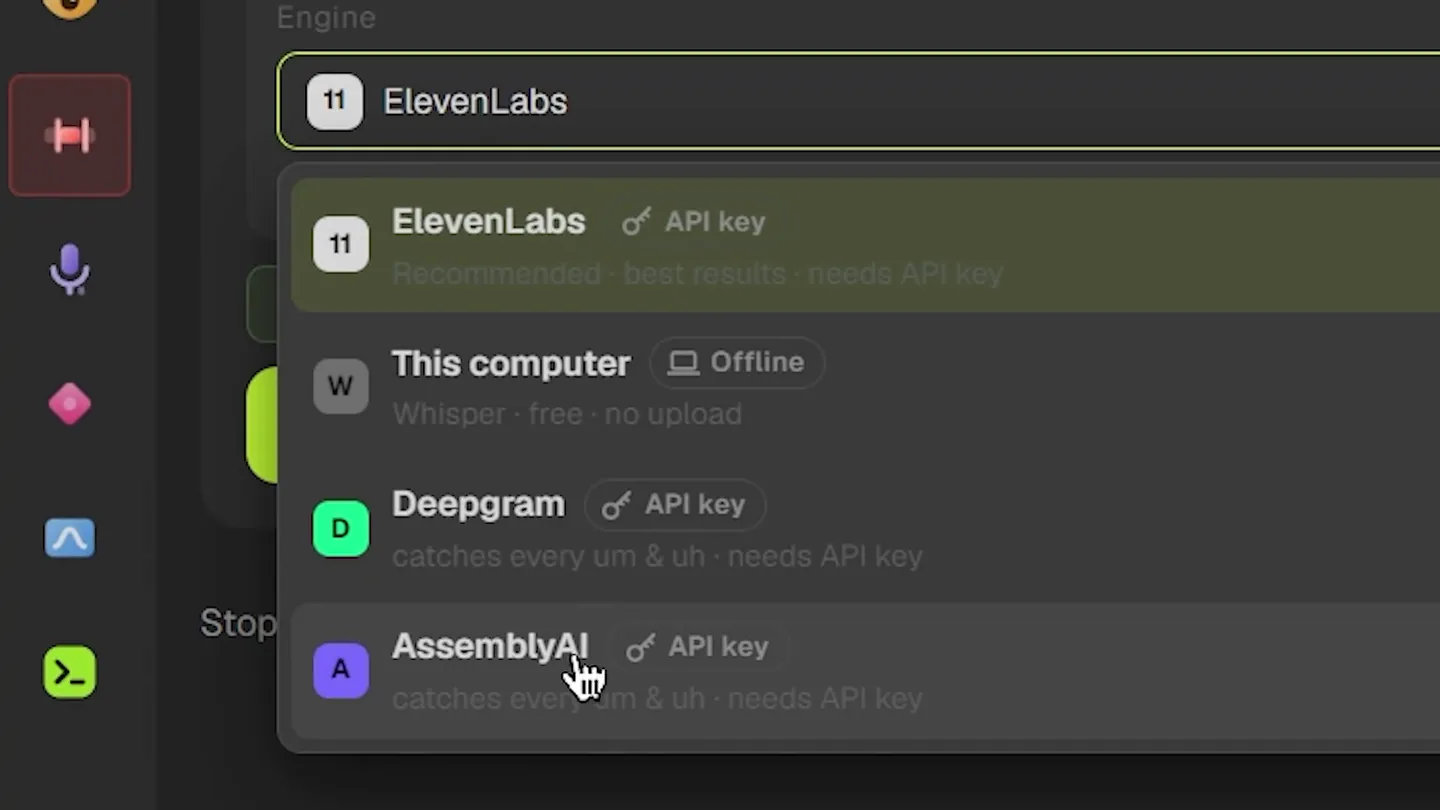
PrimCut transcribes on your computer by default with OpenAI's Whisper models, so nothing is uploaded and there is no allowance to watch. Cloud engines are there when you want them: Rough Cut's own engine menu recommends ElevenLabs for the best results, and each tool offers some of ElevenLabs, Deepgram, AssemblyAI and Speechmatics. Pick one and your audio goes to that provider on your own key, and it bills you directly. The optional Claude or ChatGPT review in Rough Cut works the same way: it sends the transcript text, not the audio, and runs on your own Anthropic key or on a Claude Code or Codex subscription you already pay for, with no markup from PrimCut.
Which is better depends on you. If you want Claude's judgment on every video with nothing to configure, AutoEdit's bundle is simpler. If you edit long podcasts every week, or you'd rather your audio stayed on your machine, PrimCut's local default removes both the upload and the hourly ceiling.
Cleaning up takes: Rough Cut vs Creator Mode
Both tools go after the same first pass: dead air, "um" and "uh", false starts and the takes you repeated three times. AutoEdit's Creator Mode lets Claude read the transcript and decide what stays, then lets you review and change those decisions before you apply them. Its pages say it's built for spoken-word footage such as talking heads, podcasts, tutorials and vlogs.
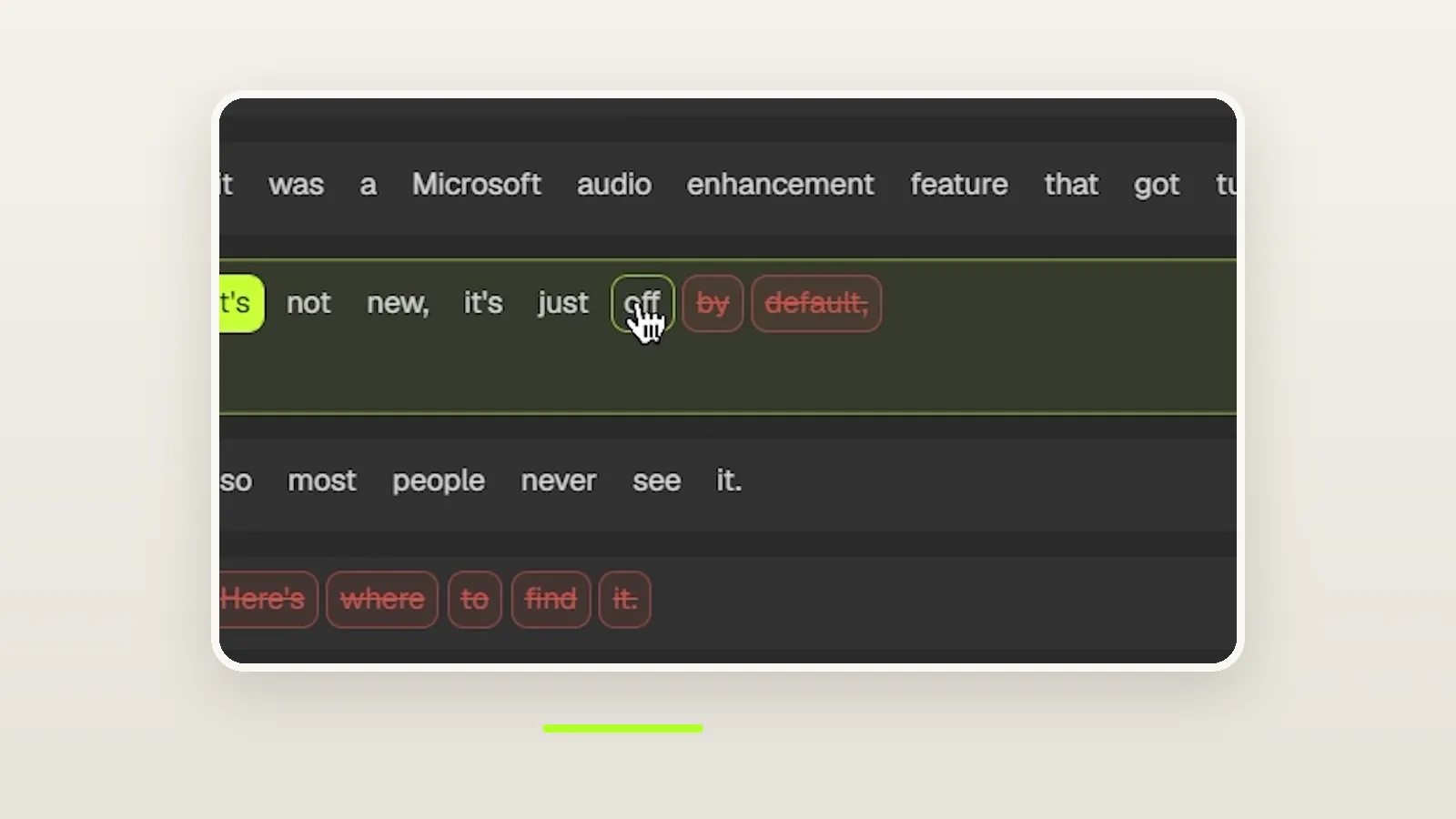
PrimCut's Rough Cut has two modes. Cleanup finds fillers, false starts, repeated takes and long pauses, and can mute profanity. Match my script takes the script you recorded from and keeps the takes that match it, a quick way to a first assembly when you read from a script. Either way, nothing is cut blind. Every proposed cut lands in a review screen where you can play each range and click any single word to keep it or remove it, and your picks always win. Rough Cut duplicates the sequence before it trims.
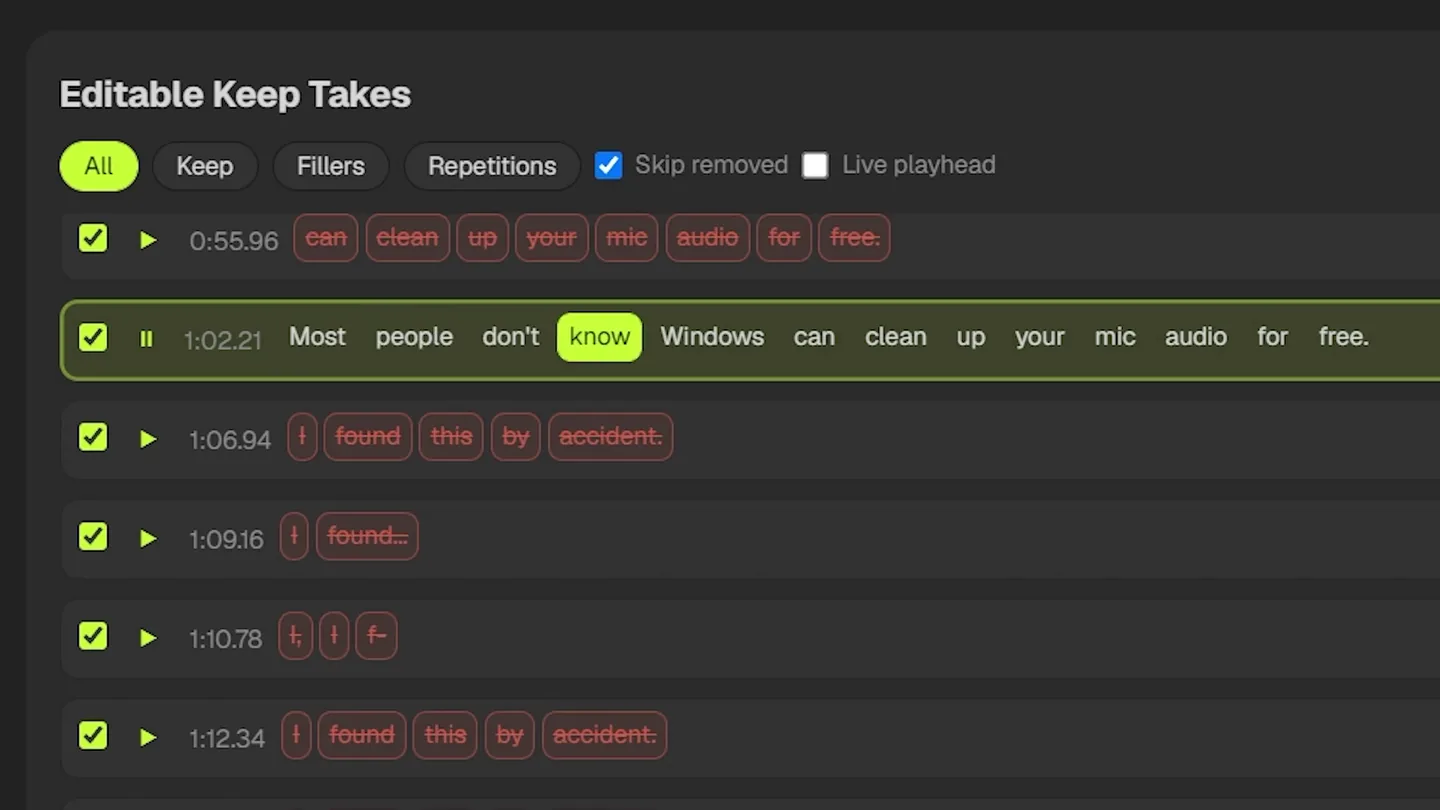
The optional AI review is what keeps meaningful words safe. With Claude or ChatGPT connected, "I like this camera" keeps its "like" while the filler "like" goes. More on the workflow in how to remove bad takes in Premiere Pro and AI rough cuts in Premiere Pro.
Editing by asking: Chat Edit vs PrimCut MCP
AutoEdit's Chat Edit lets you describe an edit in its panel. Creator includes 100 AI chats a month, and Pro and Business include 250.
PrimCut takes a different route. PrimCut MCP connects Claude Code to Premiere Pro through PrimCut, so you can ask for "cut the long pauses", "add word-by-word captions" or "find five Shorts and make vertical copies", and Claude Code does it with PrimCut's own tools. With Claude Code and Node.js installed, it can also design and render motion graphics, which PrimCut places at the right moment. Every change lands on a copy of your sequence, either after you press Apply or straight away on Auto. It's in beta, it needs Claude Code, Codex or Claude Desktop on your computer, and requests count against your own Claude or ChatGPT plan rather than a PrimCut allowance. The PrimCut MCP guide shows the setup.
Captions, podcasts and Shorts
- Captions. AutoEdit's homepage advertises AI captions in 99+ languages on its paid plans, with premium styles on Creator, and its free tools include 90+ caption MOGRTs you apply and edit yourself. PrimCut's Caption Generator transcribes on your computer in many languages, with translation, lets you proofread with AI and custom words, then places word-by-word highlight, karaoke, one-word or stacked captions as MOGRTs, including your own templates. See automatic captions in Premiere Pro.
- Podcasts. Both switch cameras to whoever is speaking. AutoEdit's Podcast Mode asks you to link each camera to that speaker's own microphone recording, then lets you set how often it switches and how long each shot holds. PrimCut's Podcast Editor reads separate mics without any AI, also works from one mixed track (beta, best with two speakers), and cuts to your wide shot when people talk over each other. More in the Premiere Pro podcast editor guide.
- Shorts. PrimCut's Viral Clips (beta) reads a long video's transcript, scores the moments most likely to work as Shorts and turns the ones you pick into their own sequences, with an optional 9:16 copy. With Claude or ChatGPT connected, the AI picks the moments and writes each title, caption and hashtags. AutoEdit's podcasters page says it can help find strong moments for short-form clips, but its plans list no tool that scores clips and cuts each into its own sequence. Its free Auto Reframe resizes footage for vertical formats. See how to turn a long video into Shorts.
Pricing compared
| Plan | Monthly | Billed yearly | What you get |
|---|---|---|---|
| PrimCut Free | $0 | $0 | B-Roll Finder, SFX Finder, Assets Library with the Starter Pack (90+ MOGRTs), Keyframe Drag Assist |
| PrimCut Creator | $15 | $109 a year | All 15 tools, premium title packs, no hourly allowance, 2 computers |
| AutoEdit Free | $0 | $0 | Seven tools: Paste Image, Silence Cutter, B-roll Library, Sound Effects, Motion Graphics, Auto Reframe, Music Library |
| AutoEdit Lite | $9.99 | $95.90 a year | AI silence removal, basic auto captions, AI music and sound effects; 10 hours of transcription and 5 of Claude processing a month; no Claude editing, bad-take removal or Podcast Mode |
| AutoEdit Creator | $29 | $176.34 the first year, then $292.32 | Claude editing, bad-take and repetition removal, Podcast Mode, premium captions, Auto Reframe, 100 chats; 40 hours of transcription and 20 of Claude processing a month |
| AutoEdit Pro | $79 | $767.88 a year | Everything in Creator, 250 chats, priority processing; 100 hours of transcription and 60 of Claude processing a month |
AutoEdit also has a Business plan at $1,743.24 a year for high-volume teams. PrimCut's price doesn't include AI: its optional Claude or ChatGPT features run on your own subscription or API key, while AutoEdit's price includes its Claude and transcription hours. For the full editing toolset, the comparison is PrimCut at $109 a year against AutoEdit Creator at $176.34 for the first year and $292.32 after that, with hourly allowances. AutoEdit's free plan is the more generous one if all you need is a silence cutter. PrimCut's free tools cover B-roll search, CC0 sound effects, an asset library and Keyframe Drag Assist. Prices are from AutoEdit's pricing page and PrimCut's pricing page on November 2, 2026.
Where AutoEdit is stronger
- Mac support. For many editors this settles it.
- Claude included, with no key, subscription or connection to set up.
- A bigger free plan: seven tools, including a silence cutter, Auto Reframe for any clip, a B-roll selector for your own footage, and music and image-pasting tools.
- AI music and sound effects on its paid plans.
- Music videos and event recaps, through its Music Video Mode add-on and the announced Event Recap Mode.
Where PrimCut is stronger
- Local by default: transcription for captions and Rough Cut, and speaker detection for mixed-track podcasts, run on your computer, with no upload and no hourly allowance.
- Cutting to a script: Match my script keeps the takes that match the script you recorded from.
- Tools AutoEdit doesn't list: zooms (Curve Zoom), a clip finder that scores Shorts and cuts each into its own sequence (Viral Clips, beta), stock B-roll search with Auto B-Roll, one-click J-cuts and L-cuts, Background Remover, watch folders, a command palette and Keyframe Drag Assist.
- Podcasts from one mixed track (beta), for shows recorded without a mic per person.
- Older Premiere versions: it works from Premiere Pro 2024, while AutoEdit needs 2025 or newer.
- Price for the full toolset: $109 a year, on two computers per license.
Which should you choose?
Choose AutoEdit if you edit on a Mac, want Claude's judgment on every video without connecting anything, or cut music videos as well as talking heads, and its hourly allowance fits how much you publish.
Choose PrimCut if you edit in Premiere Pro on Windows, want your audio processed on your own machine, edit long podcasts or many videos a week, or want zooms, Shorts and stock B-roll in the same panel as your cleanup.
Both let you try before you pay. Run the same ten-minute talking-head clip through each and compare the cuts, how much you had to fix and how long it took. If you are weighing other plugins too, see PrimCut vs AutoCut, PrimCut vs FireCut and the AutoCut alternatives roundup.
Frequently asked questions
Is AutoEdit the same as AutoCut?
No. AutoEdit is made by Eleven Percent and builds rough cuts of spoken-word footage with Claude, inside Premiere Pro. AutoCut is a different plugin, with tools for silences, captions, podcasts and zooms that also run in DaVinci Resolve. PrimCut vs AutoCut covers that one.
Does AutoEdit upload my footage?
Its privacy policy says AutoEdit extracts the audio from your project and uploads it to its servers, where ElevenLabs transcribes it and Claude analyzes it. Your video stays on your computer, and the audio is deleted after processing. PrimCut transcribes on your computer by default, so your audio stays there unless you pick a cloud engine. Its optional Claude or ChatGPT features send the transcript text, not the audio, to that provider.
Which is cheaper, PrimCut or AutoEdit?
For the full editing toolset, PrimCut Creator is $15 a month or $109 a year. AutoEdit Creator is $29 a month, or $176.34 for the first year billed yearly and $292.32 a year after that. AutoEdit Lite is $9.99 a month but leaves out Claude editing, bad-take removal and Podcast Mode. PrimCut's optional AI features run on your own Claude or ChatGPT account, while AutoEdit's price includes its AI hours. Prices were checked on November 2, 2026.
Does PrimCut use Claude like AutoEdit does?
Yes, if you want it to. Rough Cut can ask Claude or ChatGPT to read the transcript before it cuts, using your own Anthropic key or the Claude Code or Codex subscription you already pay for. PrimCut MCP (beta) lets Claude Code edit a copy of your sequence with most of PrimCut's tools. Neither is required, because transcription and cutting work without any AI account.
Do PrimCut and AutoEdit work on Mac?
AutoEdit runs on Mac and Windows with Premiere Pro 2025 or newer. PrimCut runs on Windows 10 and 11 with Premiere Pro 2024 or newer, and doesn't support macOS yet.
Can either one edit a podcast recorded on one mixed audio track?
PrimCut's Podcast Editor can, in beta, and it works best with two speakers. AutoEdit's Podcast Mode asks you to link each speaker's camera to that person's own microphone recording.
PrimCut is my product, so weigh this comparison with that in mind. AutoEdit and other product names are trademarks of their respective owners, and this post isn't affiliated with or endorsed by AutoEdit or Eleven Percent. AutoEdit details come from autoeditai.net, including its pricing, download, feature, privacy and terms pages, checked on November 2, 2026. Prices and features change, so check each site before you buy.